 Dirproof
 Pro
Everything to get your AI tool, SaaS or website listed and found: a hand-checked list of 100+ places matched to your product, a ready text for each, an autopilot that takes you through them, link checks, and an SEO and AI search check. Pay once, use it for up to 10 products.
- Get your key. Right after payment Dirproof Pro opens on this page and shows your access key. Copy it: it opens Dirproof Pro on any other device. Paddle emails you the receipt.
- Describe your product once. Fill it in from your website, then check the name, one sentence and three features. About five minutes.
- Let the autopilot lead. It opens your best matches one by one with the texts ready. You press submit; it records it.
- Check what counts. Reminders at 7, 14 and 30 days, a link checker for every listing, and checks for your site and your AI visibility.
What is on the list
- 28 ai tool directories
- 34 launch platforms
- 8 software directories
- 6 review sites
- 7 communities
- 21 brand profiles
- 8 business listings
- 3 website and blog directories
- 4 press and expert sources
90+ free to submit, 20+ paid. Price, dofollow or nofollow, DR, tips and the check date for each one.
Matched to your product
Answer four questions: what you are listing (an AI tool, SaaS, local business, agency, blog or store), budget, goal and time. Dirproof Pro ranks the places that fit and explains why.
A ready text for every site
A tagline, short and long description and maker comment for each site, cut to its limits, with a tracked link. No two sites get the same text.
An autopilot you can finish
Pick a start date and how many sites a day. The autopilot opens each site with the right text ready and records your submissions. Reminders go straight to your calendar (.ics).
Link checker
Paste your listing page: see if your link is there and whether it is dofollow. Re-check all your live listings in one click.
What AI assistants say about you
Ask AI assistants the questions your buyers ask and see whether your product comes up, and which sources they use.
SEO and AI search check
Can Google and AI crawlers read your site? Get a list of fixes, copy-paste structured data and an AI-written page title and description.
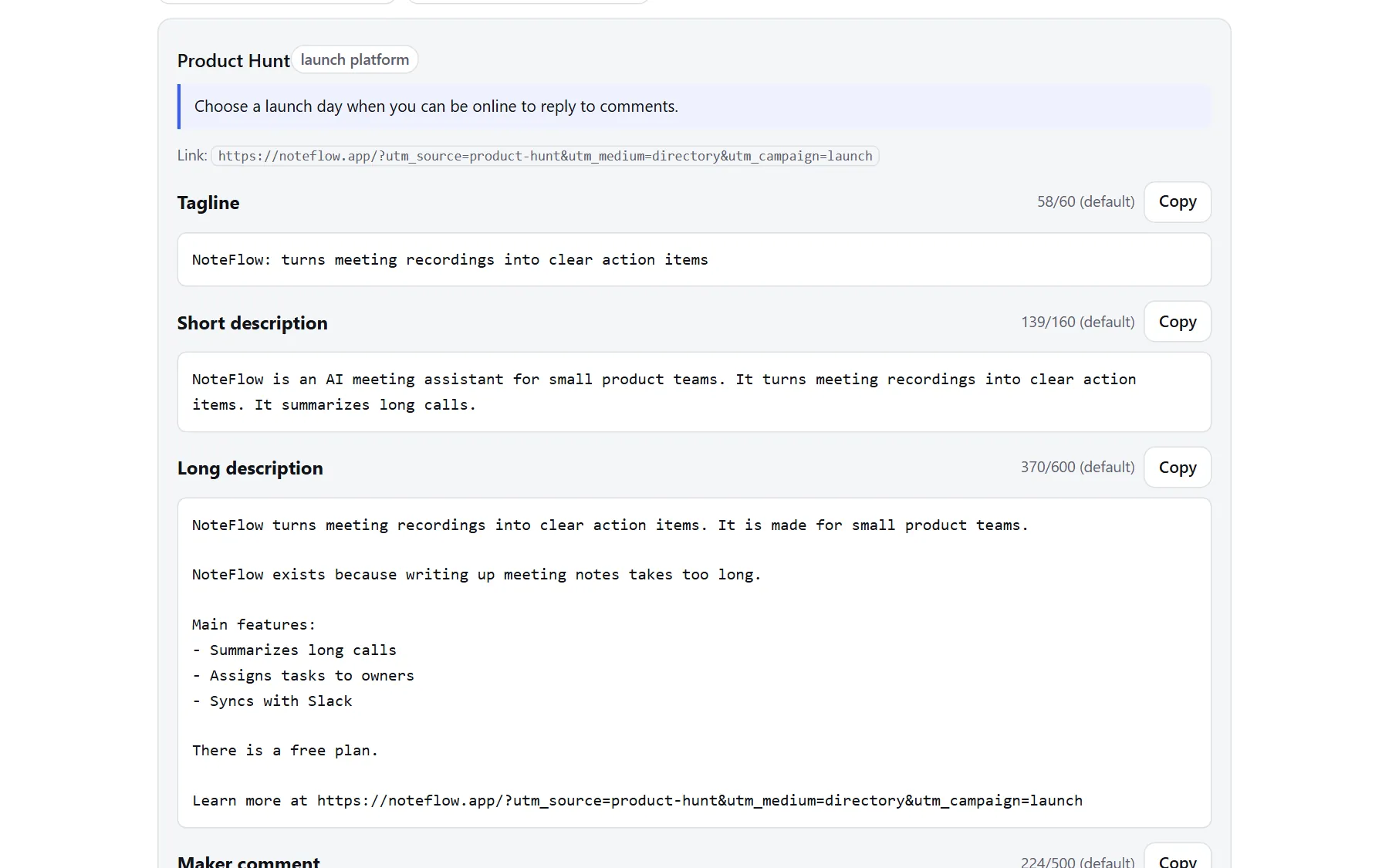
Real screenshot with an example product.
Get Dirproof Pro
$10 plus tax, one-time payment. Until December 31, 2026. From January 1, 2027 the price is $65. No subscription. 14-day refund.
Buy once and your access key appears here right away. Already bought? Enter your key below.
Checkout is handled by Paddle, our reseller. VAT or sales tax is added where it applies. Your access key appears here right after payment. 14-day refund.
Not sure yet? Try it free: see your texts for Product Hunt and Uneed first.
Lost your key?
Enter the Transaction ID from your Paddle receipt email. It starts with txn_. We check the order with Paddle and show your key again.
Can't find it? Email [email protected] from the address you paid with.
14-day refund, no questions asked. Your access key does not expire. The texts are drafts built from what you write about your product; read them before you submit. We do not promise approval, rankings or AI mentions. More answers in the FAQ.
Start here
Your access key
Use it to open Dirproof Pro in another browser or on another device. Keep it private.
Your best matches
Answer four questions. Dirproof Pro ranks the places that fit your tool, budget and goal, and shows why each one is on your list. Where we could not confirm something, it says so.
Match score: tool fit 25%, audience 20% (DR as a proxy; traffic is not measured), how easy it is to submit 15%, cost 15%, link value 15%, how recently we checked it 10%. Your goal shifts these weights.
The list
Every place to submit, ranked by score: DR ÷ 100 × 40 + dofollow 30 + free 15 + working form 10 + AI fit 5. DR is Domain Rating by Ahrefs, measured for every site on the same day. Open any site, then mark it in the plan below.
1. Your tool
Launching more than one tool? Add up to 10 tools (domains) here. Every tool keeps its own profile, texts and progress in this browser.
Fill this in once per tool. It stays in this browser. Every text is built only from what you write here.
2. Texts for each directory
These are drafts. Read and edit each one before you submit, and change at least the first sentence if a site asks for something different. Limits marked "default" are our standard limits; check the directory's form.
Fill in your tool's name, website, one-sentence description and at least one feature to see your texts.
Autopilot: submit one site after another
Dirproof Pro lines up your planned sites (or your best matches), opens each one and keeps the right texts ready. You check the form and press submit on the site; Dirproof Pro records it, sets your follow-up reminders and moves to the next site. About a minute or two per site.
Form filler (bookmarklet)
Drag this button to your bookmarks bar: Fill with Dirproof
On a directory's submission page, click the bookmark. It fills the empty fields it recognises (product name, website, tagline and descriptions) with your general texts and outlines them in blue. It never submits and never touches email, password or name fields. Check every field, then submit yourself. Works in desktop browsers; your texts stay in the bookmark, nothing is sent to us.
3. Plan & tracking
Plan your submissions
Directories are planned in score order. Only directories still marked "To do" or "Ready" get a date. With a launch day, brand profiles and waitlist sites come in the two weeks before it, your top 3 launch platforms on the day, and the rest after it.
What the statuses mean
- Planned: you picked a day. Ready: your text and images are prepared.
- Submitted: you sent the form. In review: the site confirmed it got your submission. Needs info: the site asked you for something.
- Live: your listing is published. Save its address so Dirproof Pro can check your link. Check needed: the last link check did not find a working link.
- Is this listing on Google? opens a Google search for your listing page. If it shows up, Google has found it and your link can count. Tick "Found on Google"; if it is still missing two weeks after approval, Dirproof Pro reminds you.
Use Dirproof Pro on another device (encrypted sync)
Your profiles, texts settings and progress live in this browser. To use them on another computer, save an encrypted copy to the cloud with a passphrase, then open Dirproof Pro there with your key and download it with the same passphrase. Everything is encrypted in your browser before it is sent; we store only the encrypted copy and never see your passphrase or your data. If you forget the passphrase, nobody can open the copy, not even us.
4. Link check
Paste the page where your tool is listed. We fetch that single page once and look for links to your domain. We respect the site's robots.txt and do not crawl.
Check all my live listings
Checks every listing address you saved in "Plan & tracking" in one go (up to 25, a few times a day). Each page is fetched once, with the same rules as above. If a live listing no longer links to you, it is marked "Check needed".
5. Results by directory
Every link in your texts carries utm_source with the directory's name. Export the traffic sources report from your analytics and paste it here to see which directories send visitors and sign-ups. It is read in your browser and never sent to us.
How to export the report
- Google Analytics 4: Reports, Acquisition, Traffic acquisition. Change the first column to "Session source / medium", then use Share this report, Download file, Download CSV.
- Plausible: open Sources (or UTM Sources) and export the CSV.
- Other tools: any CSV with a source column and a visitors or sessions column works. A conversions or sign-ups column is used if there is one.
6. Site check: SEO and AI search
See whether search engines and AI tools such as ChatGPT, Claude and Perplexity can read your site and get a clear picture of it. We read the page you enter, your robots.txt, llms.txt, sitemap and up to 5 internal links once. Nothing is stored.
Structured data for your homepage (schema.org)
Built only from your tool's profile: Organization, WebSite and SoftwareApplication. Paste it into the <head> of your homepage, then test it with Google's Rich Results Test. A price is added only if you wrote one in "Pricing detail".
Page title and description, written by AI
For your homepage's <title> and meta description. Uses only what you wrote in your profile and is checked for made-up claims, hype and numbers you did not give. Read it before you use it.
7. AI visibility
We ask AI assistants with web search three questions built from your profile and show whether they mention your tool. It is a snapshot, not tracking: AI answers change from day to day and from person to person.
To ask the questions, your tool's name, website, one-sentence description, kind of tool and audience are sent to the AI companies we ask. We do not store the questions or the answers.